IT analysis software that gets your infrastructure
Docusnap365 inventories your entire IT environment automatically and delivers the analysis you need for decisions, audits and day-to-day operations.
Analyze your IT infrastructure, understand it, steer it
IT analysis software inventories your existing infrastructure automatically and evaluates it systematically: permissions, vulnerabilities, dependencies and network structures. Scheduled scans keep the dataset current. That makes it answerable which systems are running, who has access to what and where risks exist – a foundation for audits, risk assessment and day-to-day operations. Docusnap365 brings inventory and analysis together on one shared data foundation.
Three prerequisites for reliable IT analysis
Sound IT analysis rests on three conditions. Address them deliberately, and you gain clarity about your own infrastructure along with a solid basis for every decision that follows.
Consolidate data from many sources
Servers, network devices, cloud services, permissions: the information lives in different systems. Every evaluation starts with bringing these sources together and reconciling them.
Keep the data current
Between two snapshots, the IT landscape changes continuously: new systems appear, permissions shift, software gets updated. Reliable analysis needs a dataset that keeps pace with these changes.
Produce meaningful results
The real question only gets answered once relationships, dependencies and changes become visible. That is when a picture emerges that decisions can actually rest on.
How to bring structure to your IT analysis
Inventory your infrastructure automatically
The Docusnap Enterprise Gateway (DEG) is installed once on-premises and scans your IT environment agentlessly, on schedule, using standard protocols such as WMI, SSH and SNMP. More than 25 inventory modules cover servers, clients, network devices, virtualization, cloud services and more. Results flow automatically into the central cloud CMDB.
Analyze and evaluate
Based on the collected data, targeted analyses are ready to use: permission structures in the Windows file system, vulnerabilities through CVE matching, network topologies as auto-generated maps, dependencies between IT components. Every evaluation draws on the same dataset that powers the documentation.
Use and export the results
IT maps can be exported as Visio or PDF. Vulnerabilities receive deadlines and owners. Permission questions are answered in minutes. And the AI chat delivers answers to natural-language queries, straight from the CMDB.
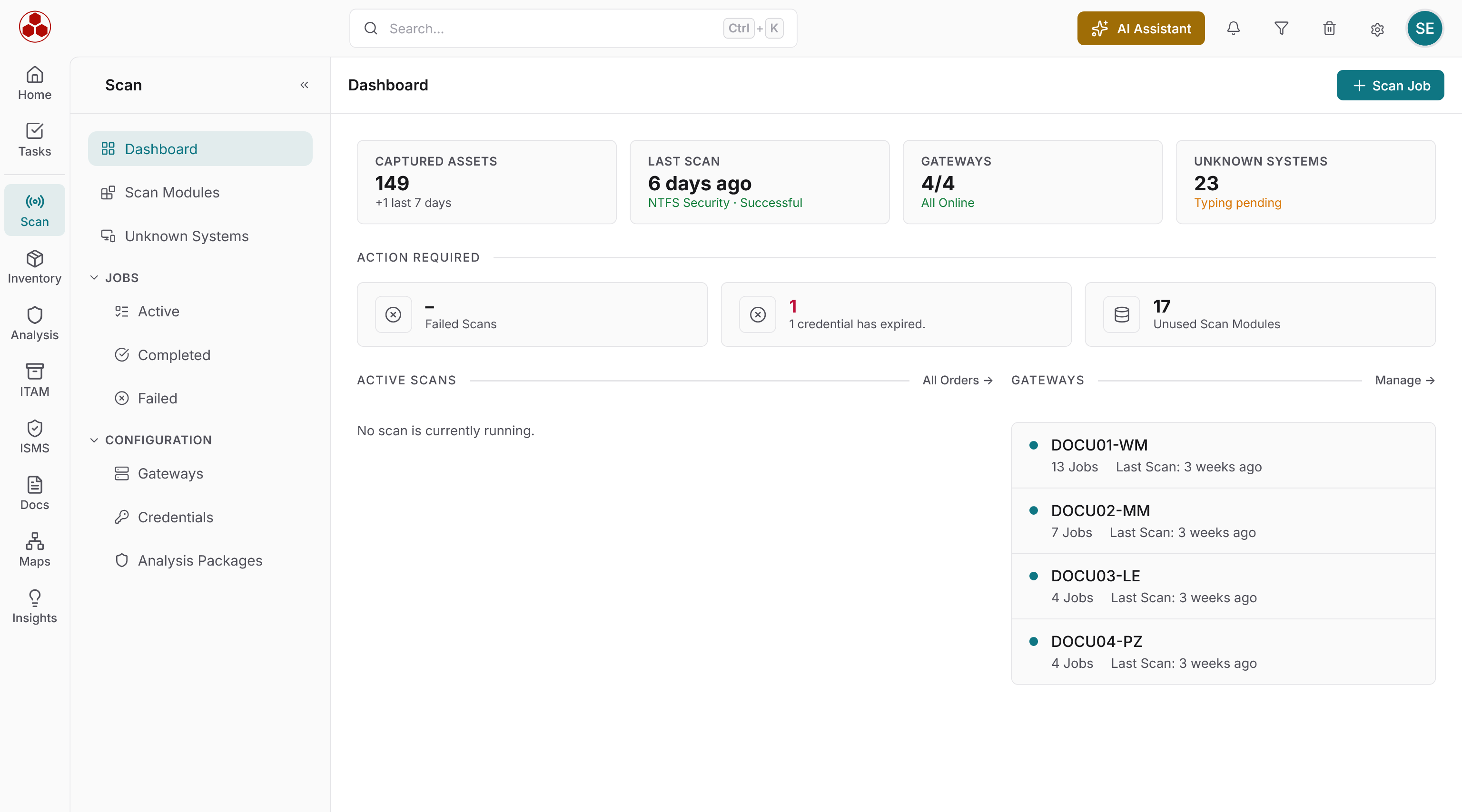
Want to see what automated IT infrastructure analysis looks like in practice?
Analysis built on real infrastructure data
Every evaluation draws on the shared CMDB. The data comes from the automatic inventory, is refreshed with each scan and covers on-premises and cloud environments alike.
Permission analysis
Evaluate file, share and group permissions across the Windows file system. Two directions of analysis: from the user's perspective and from the resource's perspective. Nested groups and inherited rights are displayed graphically.
Vulnerabilities and patch status
CVE matching against the estate that is actually installed, including software outside regular patch management. Every vulnerability receives a deadline, an owner and a status. Lifecycle tracking identifies end-of-life components.
Network and topology maps
Topology, network and routing maps are generated directly from the inventoried data and updated with every scan. Export as Visio, PDF and other formats.
Dependencies and relationships
Docusnap365 identifies relationships between IT components automatically during the inventory. The graphical view shows which systems depend on each other and where critical connections exist.
AI-powered evaluation
The AI chat answers infrastructure questions in natural language. Full-text search across all data, creating and linking objects directly from the chat. The proprietary AI model runs in the EU.
IT asset analysis
Keep lifecycle status, cost trends and warranty status in view. AI-powered recommendations for renewal, consolidation and savings potential based on age, status and cost trajectory.
IT analysis on one shared data foundation
Inventory and analysis in one system
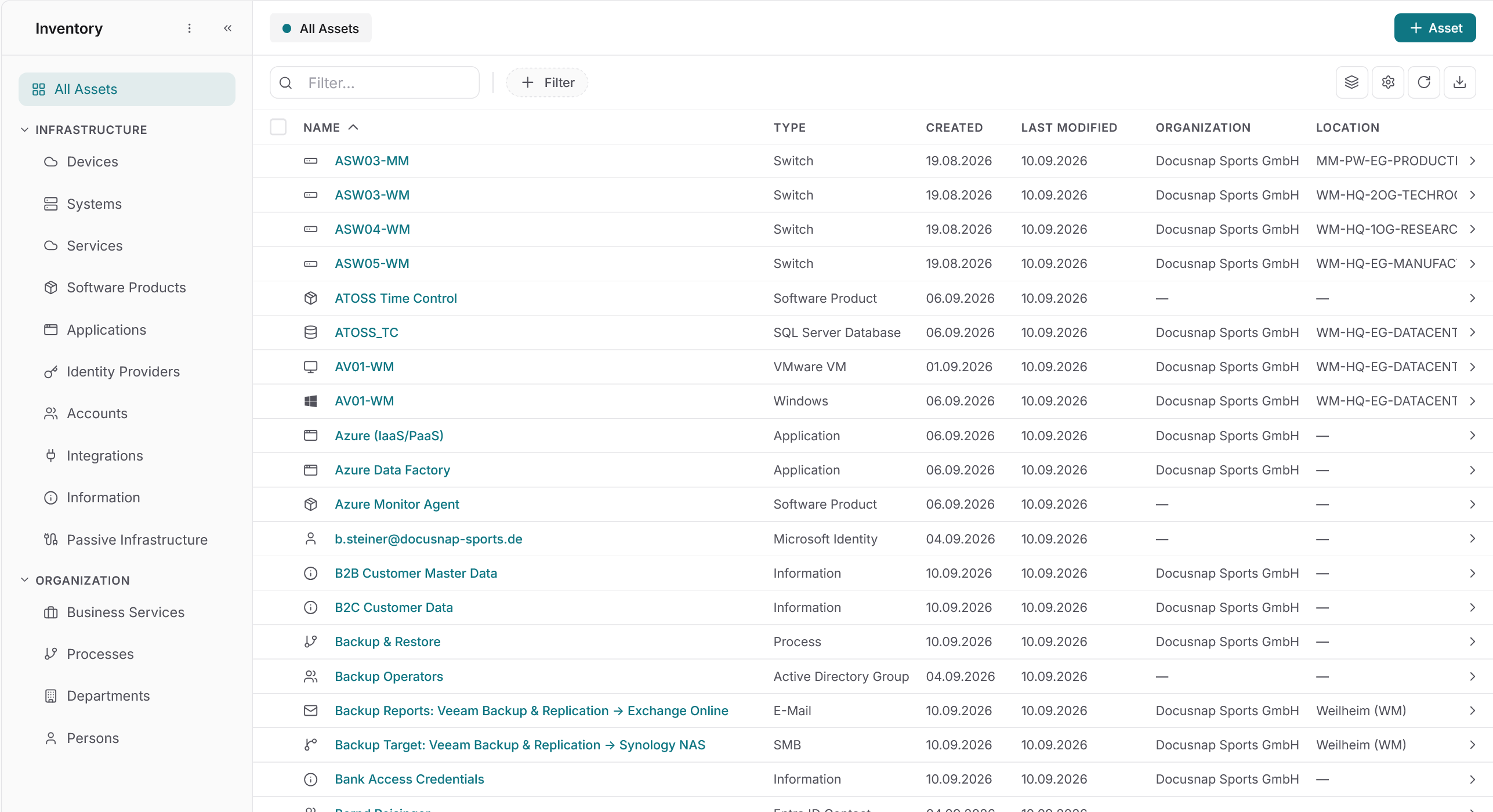
Docusnap365 inventories and analyzes on the same data foundation. Permissions, vulnerabilities, network maps and asset information all draw on one shared dataset. IT leaders work with a single source they can keep current continuously.
Agentless discovery, secure operation
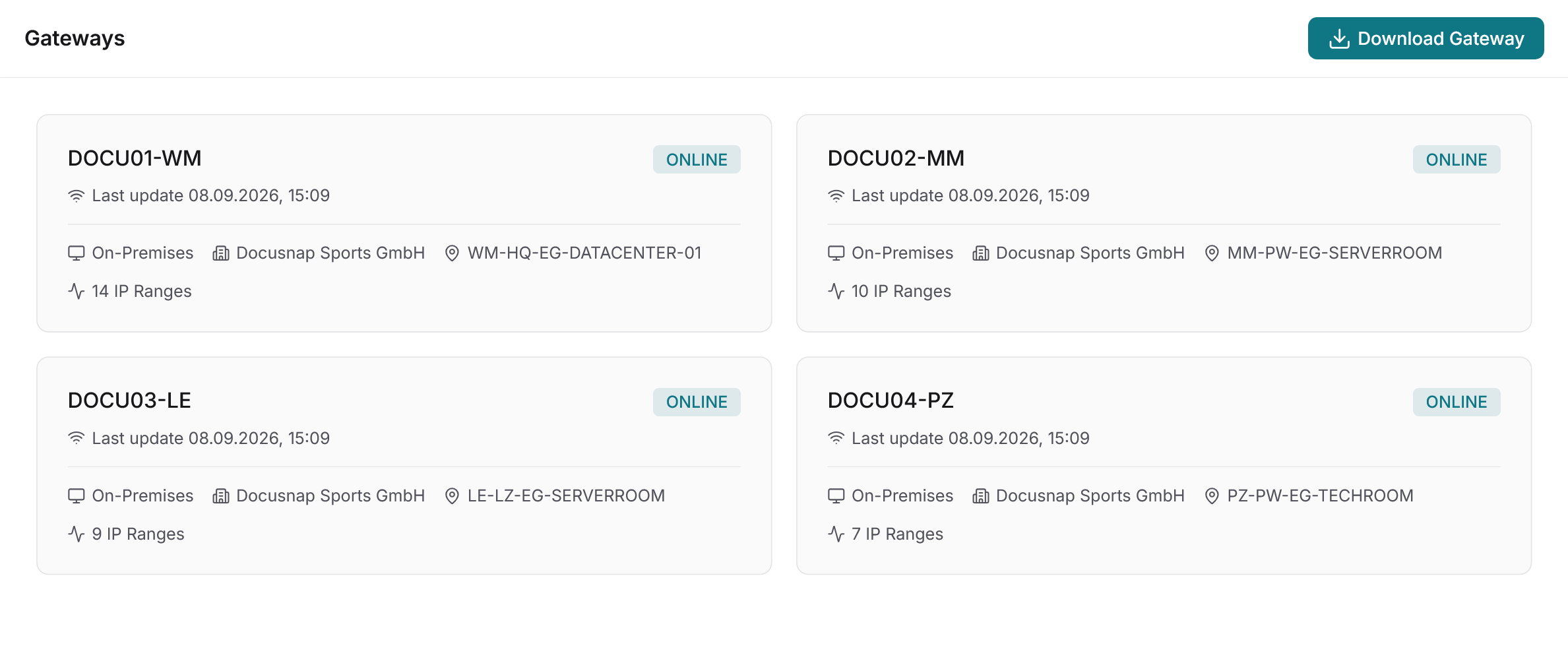
Discovery is fully agentless: the Docusnap Enterprise Gateway (DEG) scans locally and transfers results to the cloud CMDB via an outbound HTTPS connection. Credentials stay exclusively in the DEG at all times.
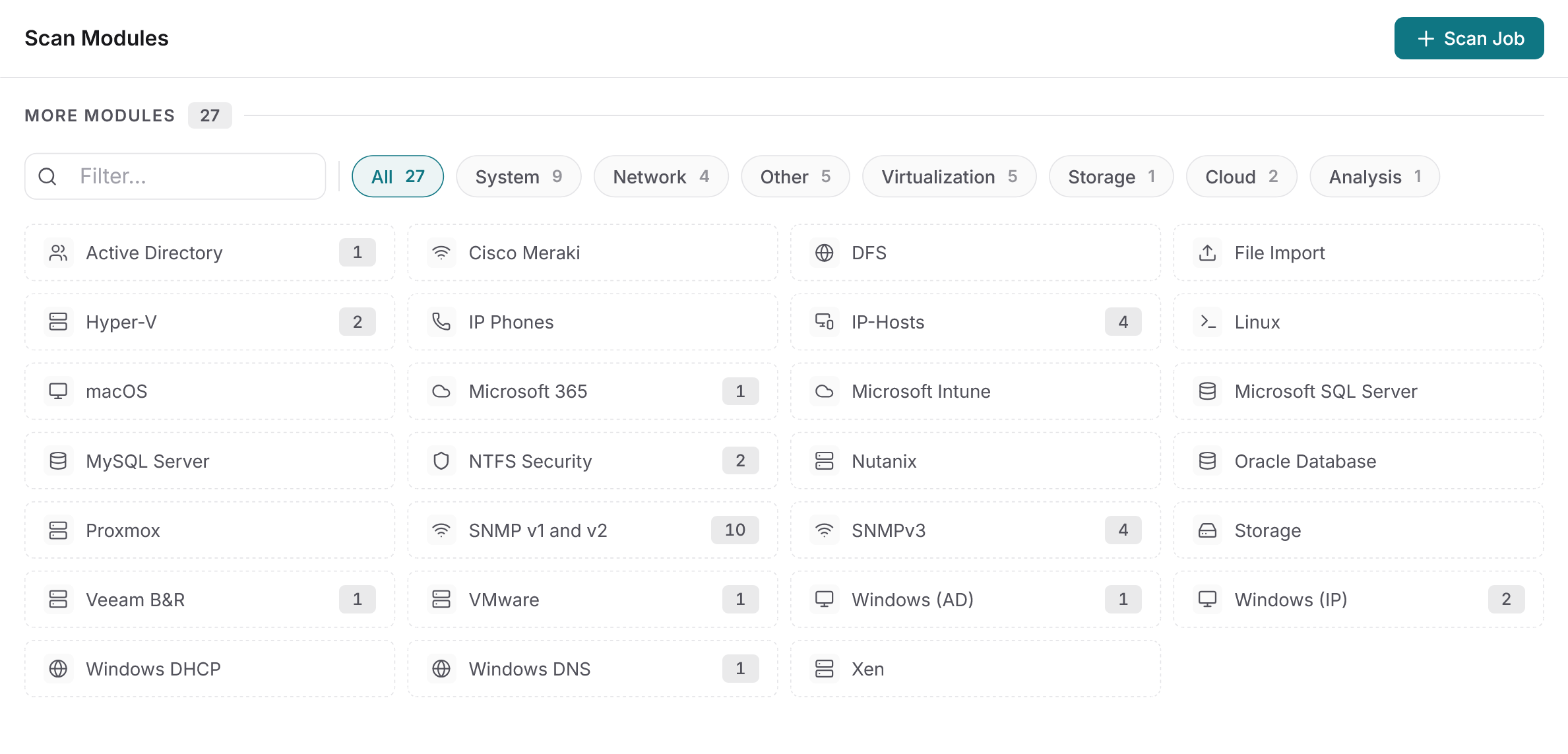
25+ modules, one license
Active Directory, Microsoft 365, VMware, Hyper-V, Linux, SNMP, databases and many more platforms: every inventory module is included in every Docusnap365 license. Unlimited sites, unlimited gateways.
More than analysis: the complete IT management platform
Docusnap365 combines inventory, documentation, analysis, ISMS and IT asset management on one shared data foundation. Every module uses the same CMDB.
Automatic inventory
Agentless discovery of your entire IT infrastructure with 25+ modules. Scheduled, cross-site, automatically current.
IT documentation and CMDB
A central, structured dataset for your entire IT infrastructure. On-premises and cloud in the same CMDB, with automatic relationship detection.
ISMS and compliance
Risks, vulnerabilities and measures based on CMDB data. Support for ISO 27001, NIS2 and BSI IT-Grundschutz.
IT asset management
Lifecycle, costs, contracts and warranty status per asset. Monthly evaluations and AI-powered recommendations.
Common questions about IT analysis with Docusnap365
What exactly is IT analysis software?
IT analysis software inventories your existing IT infrastructure and evaluates it systematically. This includes the automatic discovery of hardware, software and network components as well as the analysis of permissions, vulnerabilities, dependencies and network structures. The goal: a current, queryable overview of your entire IT environment.
How does an infrastructure assessment work in Docusnap365?
The Docusnap Enterprise Gateway is installed once on-premises and scans the IT environment agentlessly using standard protocols. Results flow automatically into the cloud CMDB. On that data foundation, analyses are ready to use for permissions, network topologies or vulnerability matching. The entire process can repeat on schedule so the dataset stays current.
Which areas of IT infrastructure does Docusnap365 cover?
Docusnap365 inventories and analyzes Active Directory, Microsoft 365, Windows and Linux systems, VMware, Hyper-V, network devices via SNMP, databases (SQL Server, MySQL, Oracle) and storage systems, among others. More than 25 inventory modules are available, all included in every license.
Do I need an agent on the target systems?
No. Docusnap365 is fully agentless. The local gateway uses standard protocols such as WMI, SSH and SNMP and requires only an outbound HTTPS connection to the cloud. Credentials stay exclusively in the gateway, and the target systems remain untouched.
How does IT analysis software help with audits and compliance?
Docusnap365 provides the data foundation that evidence rests on: permission analyses, vulnerability documentation, IT maps and a complete risk register. Supported frameworks include ISO 27001, NIS 2 and BSI IT-Grundschutz. Certification and audit execution remain with the organization and its auditors; Docusnap365 delivers the structured evidence base.
Can I process the analysis results with my own AI tools?
Yes. Via the MCP interface (Model Context Protocol), the entire dataset is available outside Docusnap365 as well. The REST API additionally provides bidirectional access for reading and writing. Basic knowledge of REST and JSON is required for integration.
Analyze your IT infrastructure, with clarity and depth
See for yourself what insights Docusnap365 can deliver about your IT environment.