Solutions
Make IT costs transparent
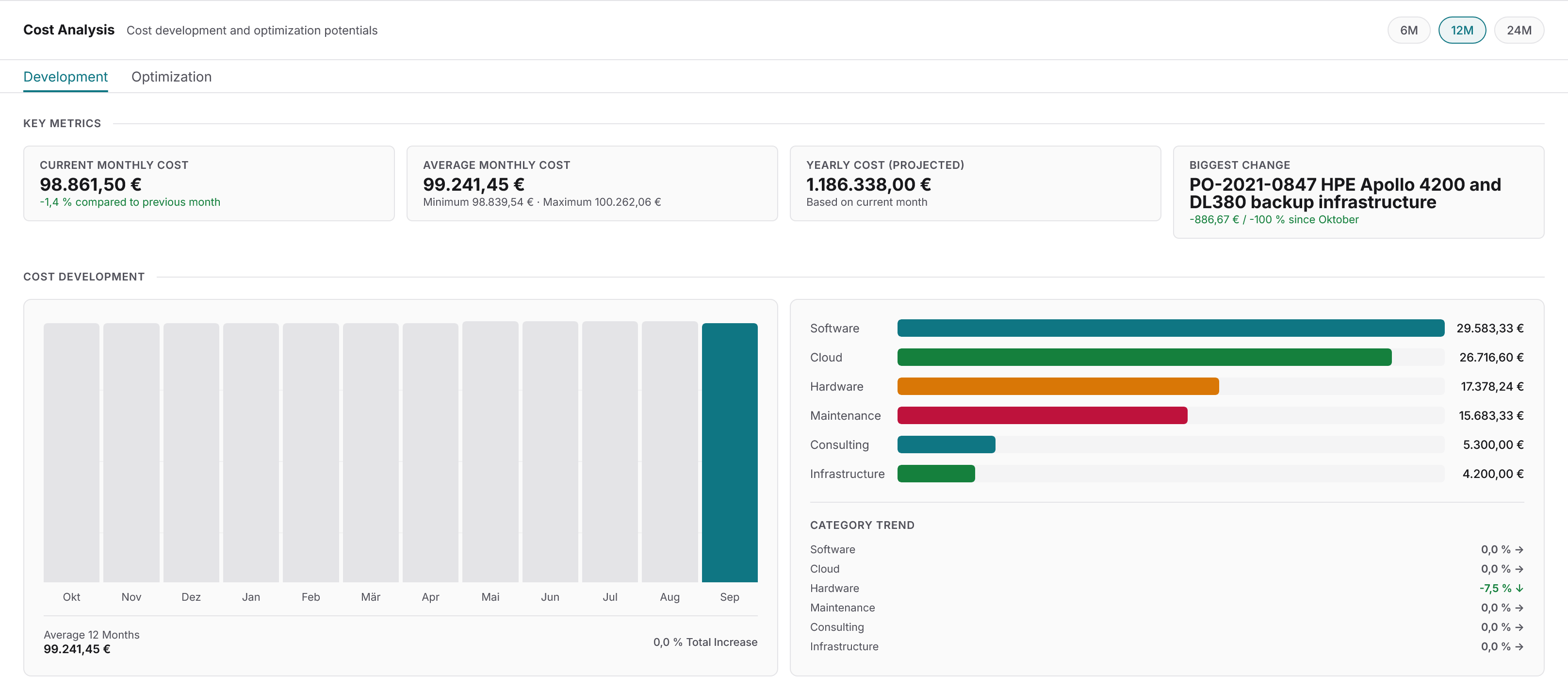
Docusnap365 shows where your IT budget actually goes, broken down by device, department, and location.
Trusted by more than 5,000 organizations
The cost problem
Where IT costs become invisible
IT managers know the drill: leadership asks for IT costs per department, and it takes days to pull the numbers together. Not because the data does not exist, but because it lives in too many separate systems.
Scattered data
Hardware in one system, licenses in a spreadsheet, cloud costs in the provider portal. Anyone trying to consolidate IT costs works across three systems at once and ends up comparing apples to oranges.
Manual upkeep, outdated numbers
Cost overviews updated manually once a quarter do not reflect the current state. Decisions are made on a basis that was already outdated at the time of collection.
Missing allocation
Without clear allocation to cost centers, departments, or locations, no one can answer what a workstation actually costs. Controlling receives estimates instead of facts.
The path to transparency
From data gaps to a complete cost picture
IT cost transparency starts with a complete asset inventory. Automated discovery captures every device, application, and contract, while cost allocation assigns spending to departments, locations, and cost centers. Acquisition, maintenance, licenses, and depreciation flow into a single data source. Monthly, period-accurate reports then deliver the figures you need for sound investment decisions.
Capture
Docusnap365 inventories all assets automatically and without agents: no manual tracking of hardware and software is required. You only enter license terms and attach the related contracts.
Allocate
Every asset receives its costs: acquisition, maintenance, licenses, depreciation. Allocation is flexible across devices, users, departments, locations, and cost centers.
Report
Monthly reports show cost trends per device, department, and cost center. Period-accurate figures fit the reporting cycle of your controlling function, with no manual preparation required.
What Docusnap365 makes visible
Every cost item on the right asset
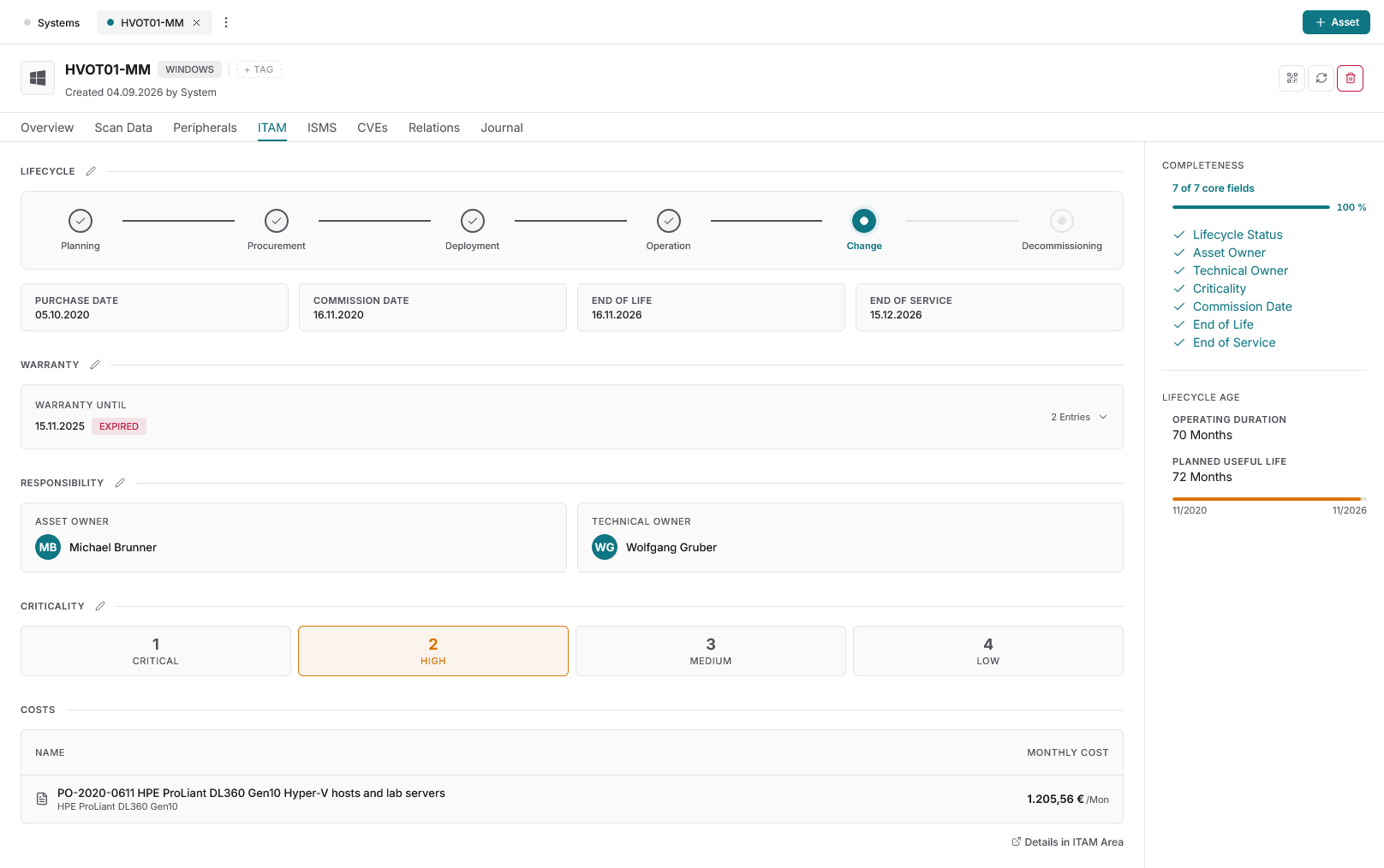
Docusnap365 captures what exists in your environment and what it costs. All cost data sits where it belongs: directly on the asset.
Complete cost capture
Acquisition costs, maintenance contracts, license fees, and depreciation per asset. Receipts and contracts are stored directly on each object and available at any time.
Flexible allocation
Costs can be broken down by device, user, department, location, and cost center. The structure adapts to your organization, not the other way around.
Warranty and lifecycle
Automatic matching of serial numbers against manufacturer databases shows which devices are still under warranty and where renewal is needed.
AI-powered recommendations
Docusnap365 analyzes the age, lifecycle status, and cost trajectory of every asset. Its AI recommends where renewal, consolidation, or cancellation makes economic sense.
What changes with transparent IT costs
Before
- Costs are estimated because the data is missing
- Quarterly manual collection in spreadsheets
- No allocation to departments or locations
- Investment requests without reliable figures
- Unused licenses and duplicate contracts go unnoticed
After
- Actual costs per device, department, and location
- Monthly, automatically updated reports
- Period-accurate figures in step with the controlling cycle
- Upcoming investment needs visible through age, utilization, and lifecycle status
- Savings potential in licenses, contracts, and depreciated hardware made visible
Frequently asked questions about IT cost transparency
Which IT costs can Docusnap365 capture?
Docusnap365 captures acquisition costs, maintenance contracts, license fees, and depreciation per asset. Receipts and contracts are stored directly on the object. Allocation covers devices, users, departments, locations, and cost centers.
How are costs allocated to departments?
Cost allocation in Docusnap365 is flexibly configurable. Every asset can be assigned to a cost center, a department, a location, or a user. The structure follows your own organization.
What reports are available?
Docusnap365 delivers monthly cost reports per device, department, and cost center. Reports are period-accurate and fit the reporting cycle of your controlling function. In addition, the AI analyzes the inventory and provides recommendations on renewal and savings potential.
Do I need a separate ITAM tool for this?
No. IT asset management is a module of the Docusnap365 platform and included in every license. Cost tracking works on the same data as inventory, IT documentation, and ISMS.
Make IT costs visible
Try Docusnap365 and see for yourself where your budget actually goes.
Trusted by more than 5,000 organizations