IT documentation software that keeps your IT current
From servers to cloud services: Docusnap365 inventories your entire IT infrastructure agentlessly and creates documentation that updates itself with every scan.
What IT documentation software does for your IT department
IT documentation software inventories an organization's entire IT infrastructure automatically: servers, clients, network devices, cloud services and their dependencies flow into a central data repository that updates with every change. IT managers get an accurate, real-time view of their environment as a reliable foundation for operations, planning and audits. Docusnap365 implements this approach as a cloud platform: agentless discovery, a central CMDB and an integrated AI chat form the foundation. From the collected data, the platform generates network maps, permission analyses and topology diagrams that update automatically with every scan. This enables IT departments to build IT documentation that reliably reflects the actual state of their infrastructure, today and with every future change.
What makes IT documentation work
Three criteria every documentation solution needs to meet.
Currency
IT documentation is only as good as its last update. A reliable IT documentation tool keeps data current through regular scans: changes to servers, network devices or cloud subscriptions are captured automatically on the next run.
Completeness
Documentation that only covers part of the environment is of little help when it matters most. All systems belong in a single data repository: on-premises, cloud and hybrid infrastructures, with all their dependencies.
Auditability
When the auditor asks, only answers backed by evidence count. Good IT documentation software delivers reports, topology diagrams and permission records at the push of a button, export-ready and current.
How Docusnap365 documents your IT infrastructure
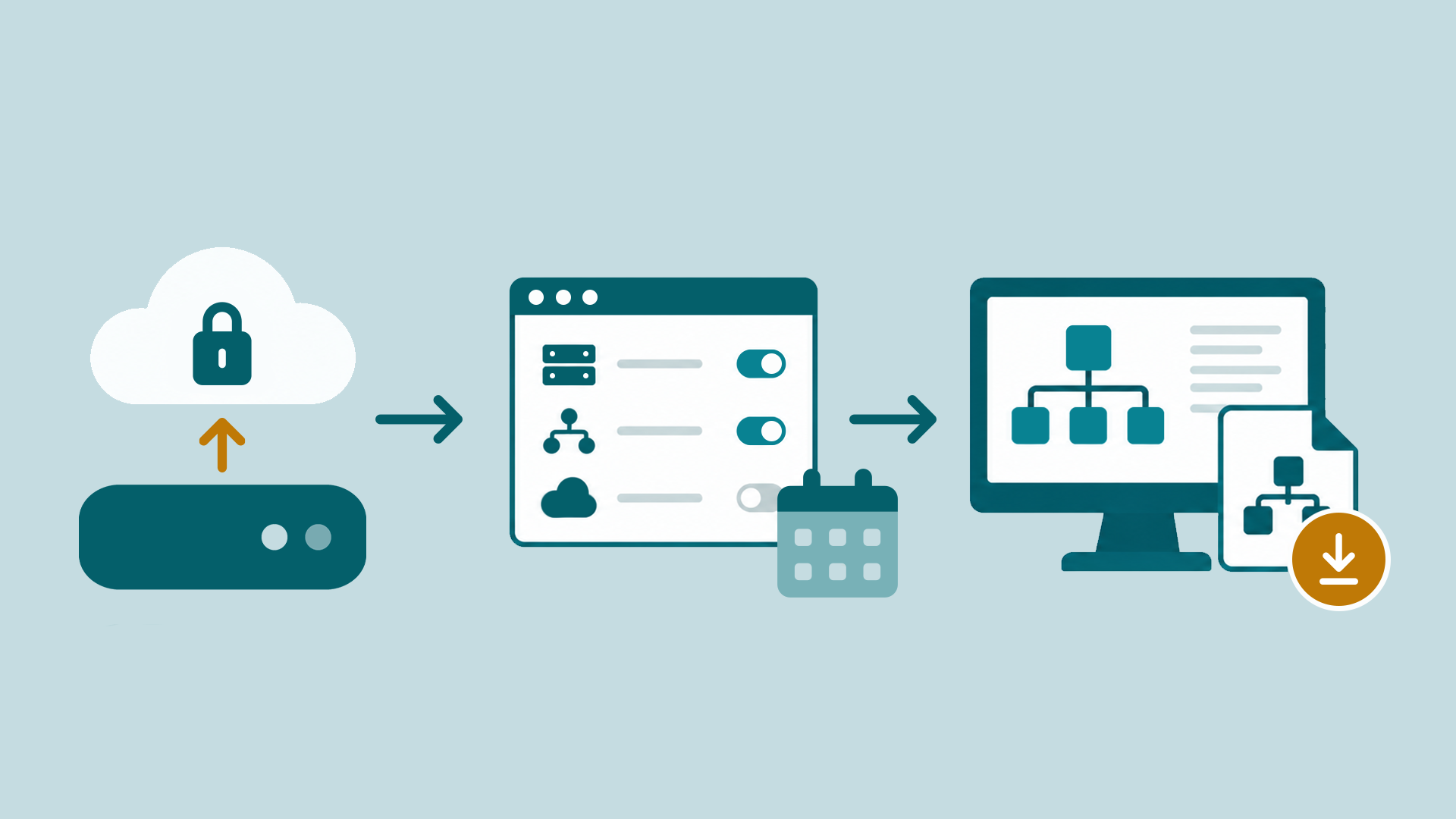
Data flow in Docusnap365:
the local gateway scans the IT environment and transfers results to the cloud CMDB
What systems Docusnap365 inventories
More than 25 discovery modules, all included in every Docusnap365 license. Automated discovery works agentlessly via WMI, SSH and SNMP and covers the following areas:
Servers and clients
Windows, Linux, macOS: hardware, installed software, running services and network configuration at a glance.
Virtualization
VMware, Hyper-V, Proxmox, Nutanix: VMs, hosts, datastores and snapshots, centrally documented.
Cloud and identity
Microsoft 365, Intune, Active Directory: users, licenses, groups, GPOs and compliance policies in the same CMDB as your on-premises infrastructure.
Networking
Switches, routers, access points: discovery via SNMPv1/v2/v3 and Cisco Meraki, including IP hosts, DHCP and DNS.
Databases
Microsoft SQL Server, MySQL, Oracle: instances, schemas, permissions and configurations, captured automatically.
Backup and storage
Veeam Backup & Replication, SAN/NAS systems: jobs, repositories and protected machines at a glance.
What sets Docusnap365 apart from other documentation tools
Agentless and non-intrusive
Docusnap365 scans via WMI, SSH and SNMP. Target systems remain completely untouched: read-only access over standard protocols. A principle trusted by more than 5,000 companies.
Automatically current
Once configured, discovery runs on schedule in the background. Network maps, topology diagrams and asset data update with every scan, whether daily or weekly.
One data source for everything
On-premises servers and cloud services in the same CMDB. Docusnap365 detects relationships and dependencies between components automatically and visualizes them.
AI support hosted in the EU
The integrated AI chat answers questions directly from the documented infrastructure: natural language, instant answers. The AI model runs in the EU, on dedicated infrastructure, GDPR-compliant.
Ask your IT documentation
The integrated AI assistant answers questions straight from the documented infrastructure, in plain language and based on the latest scan.
42 servers at the Munich site, 31 of them virtual on four hosts.
Seven servers run Windows Server 2012 R2, support ended in October 2023.
18 accounts across three groups, four of them with full access.
96 clients and five servers have had no update for more than 30 days.
Four instances on three servers, two of them holding ERP databases.
IT documentation without and with Docusnap365
What changes when documentation is generated automatically instead of depending on individual people.
Without automated IT documentation | With Docusnap365 |
|---|---|
Documentation is outdated the moment something changes. New VMs, migrated services, changed IP ranges: all manual rework. | Every scan captures the current state automatically. New VMs, changed IPs, additional cloud services are documented after the next run. |
Network map in Visio, IP list in Excel, credentials in OneNote. When an outage hits, the team searches for the right file first. | Network maps, asset data and permission analyses in a central cloud CMDB. One search, one source, one current state. |
Audits tie up days of preparation. Every follow-up question from the examiner creates work because data must be gathered from multiple sources. | Reports, topology diagrams and permission records can be exported at the push of a button: as PDF, as Visio file or via API. |
When the person with the overview is unavailable, the rest of the team loses its working foundation. | Documentation belongs to the organization, not to individual heads. Everyone on the team sees the same, current state of the infrastructure. |
Frequently asked questions about IT documentation software
What exactly does Docusnap365 capture, and which platforms are covered?
More than 25 discovery modules cover the full range: Windows, Linux, macOS, virtualization (VMware, Hyper-V, Proxmox, Nutanix), cloud services (Microsoft 365, Intune), network devices via SNMP and Cisco Meraki, databases (SQL Server, MySQL, Oracle), Active Directory, DHCP, DNS and backup systems like Veeam. All modules are included in every license.
Do I need an agent on the target systems?
Docusnap365 is fully agentless. The Docusnap Enterprise Gateway (DEG) handles scanning locally in your environment via WMI, SSH and SNMP. The target systems themselves remain untouched: read-only access over standard protocols.
How current is the documentation after infrastructure changes?
As current as the last scan. Scheduled discovery runs in the background, daily, weekly or on a custom schedule. Every run updates the CMDB, network maps and asset data automatically. New servers, changed IPs, additional cloud services: all documented on the next run.
We operate multiple sites and a hybrid environment. Is that covered?
Yes, fully. On-premises systems and cloud services feed into the same CMDB. You can deploy a separate DEG per site or security zone, with no limit on the number of gateways or locations. Segmented environments with separate security zones are supported.
How do I get the documented data into other systems?
Docusnap365 exports to Visio, PDF, CSV and Excel. Network maps and topology diagrams can be shared directly as files. For automated data exchange, a bidirectional REST API and the MCP interface are available, which also enables integration with your own AI tools.
Where is the collected data stored and processed?
Asset data resides in the Docusnap365 cloud CMDB. Credentials remain exclusively in the local gateway and stay within your environment. Docusnap365 requires just a single outbound HTTPS connection. The AI model runs in the EU on dedicated infrastructure, GDPR-compliant.
Ready to automate your IT documentation?
From the first scan to complete IT documentation: discover how Docusnap365 captures your infrastructure, keeps it current and makes it audit-ready.