Agentless inventory for on-premises IT and cloud
Docusnap365 captures your entire IT infrastructure on a schedule, with no software deployment on target systems.
No agents, no software deployment, no open ports
How it works
Automatic inventory in three steps
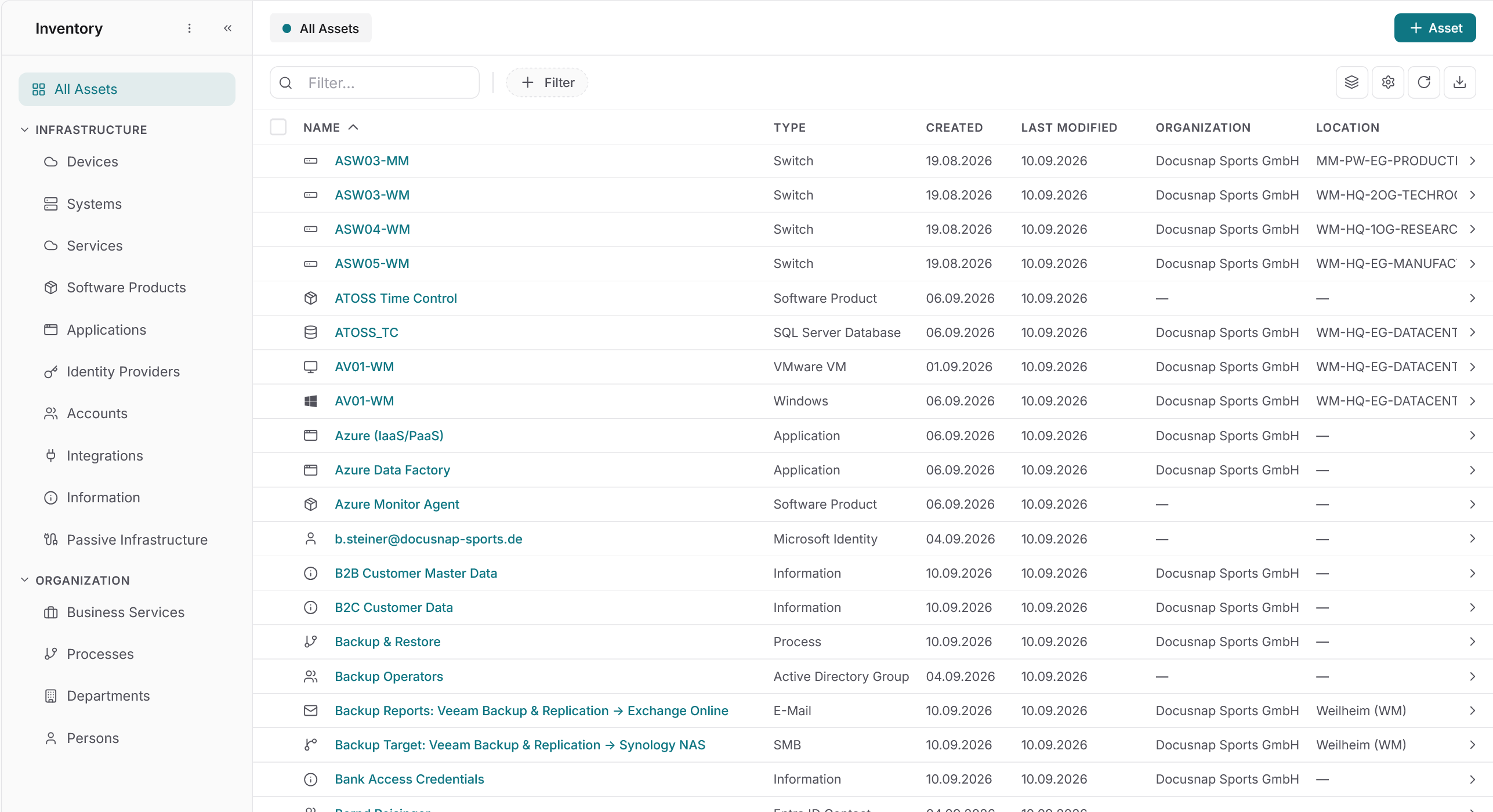
Docusnap365 inventories IT infrastructure automatically and without agents on the target systems. A local gateway, the Docusnap Enterprise Gateway, runs scheduled scans and transfers the results to your personal Docusnap365 environment. It covers on-premises systems such as Windows, Linux and network devices as well as cloud services like Microsoft 365 or Intune. Credentials stay entirely in the customer environment.
Install the gateway
The Docusnap Enterprise Gateway (DEG) is installed in your local environment. It acts as the bridge between your network and the Docusnap365 cloud.
Configure scan jobs
Select the inventory modules you need, store the credentials and set the schedule. Docusnap365 then scans regularly and fully automatically.
Results in the CMDB
Inventory data is written automatically to your personal Docusnap365 cloud environment. From there it is available as structured data (CMDB) for analysis, reporting and compliance.
Control and flexibility
Inventory that adapts to your environment
Docusnap365 provides the tools a professional IT inventory needs in day-to-day operations, from scan versioning to support for complex network architectures.
Versioned scans
Every scan run is stored as its own version, giving you full visibility into earlier states of your infrastructure at any time.
Tiered network support
Docusnap365 supports tiered network architectures. Even segmented environments with separate security zones are reliably inventoried.
Credentials under your control
Credentials for inventory scans are stored in the Docusnap Enterprise Gateway and never leave your environment. Alternatively, you can store credentials securely in your Docusnap365 environment.
Flexible scheduling
Scan jobs can be scheduled individually: daily, weekly or at custom intervals. Each module can have its own schedule.
Unlimited locations
There is no limit on the number of locations or gateways. Every branch office or data centre can be connected with its own DEG.
Discover dependencies and relationships
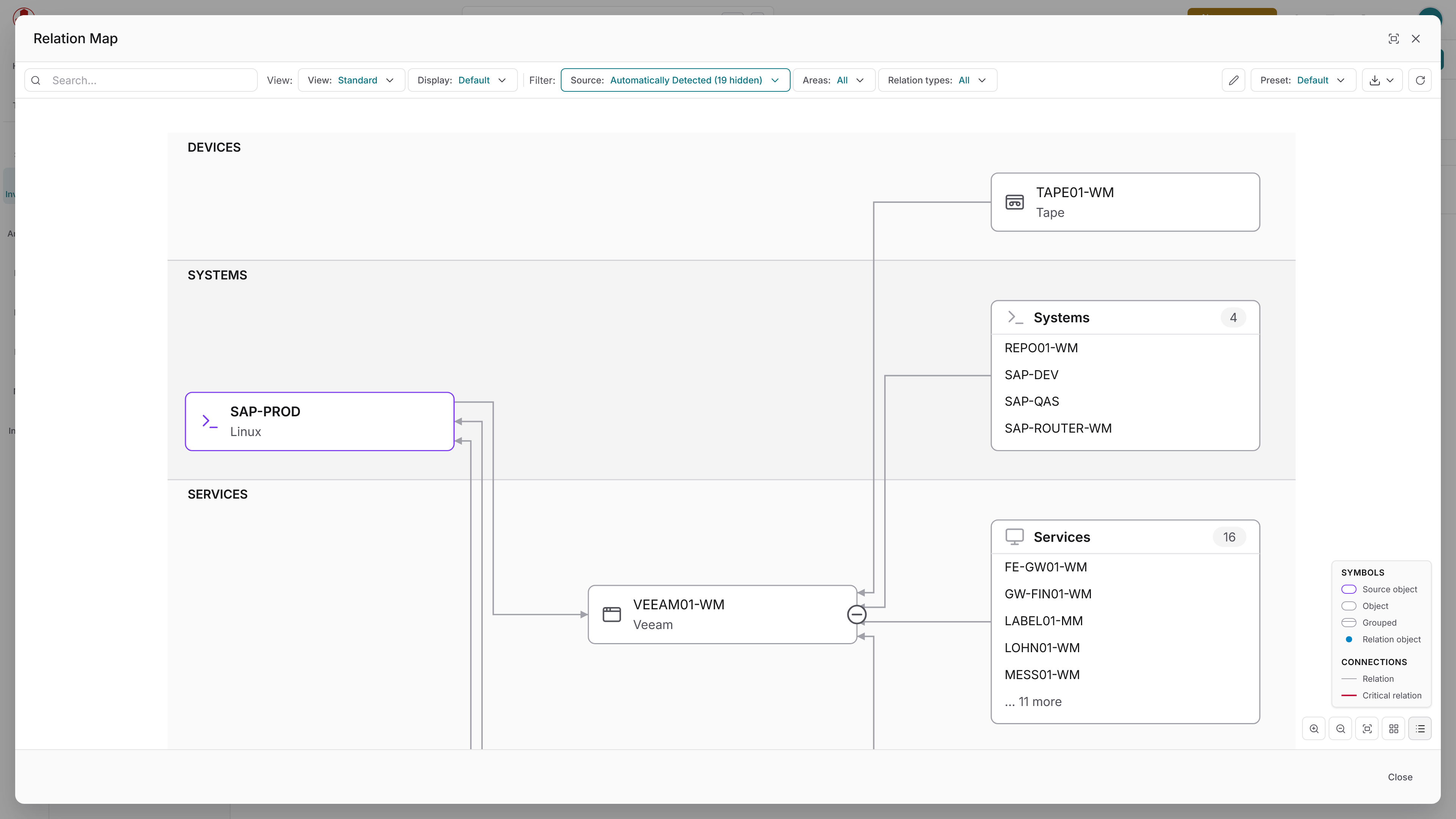
Docusnap365 identifies dependencies and relationships during the scan and documents them automatically: between devices, people, software, assets and all other items in your CMDB. The connections are then available not only as data records but also as graphical visualisations.
Add data sources
Manual and automated data entry
Not every piece of information can be scanned. Docusnap365 therefore offers several ways to add inventory data manually or import it from third-party systems.
Manual entry
Assets, contracts or location information can be created and maintained directly in the Docusnap365 interface.
CSV and Excel import
Structured data from spreadsheets or export systems is imported into the CMDB via file import.
Built-in AI
The integrated AI chat lets you prepare, import and edit data.
API and MCP
The Docusnap365 API and the Model Context Protocol (MCP) allow data to be created and updated programmatically. This enables integration with existing automation workflows and AI-powered processes.
Inventory modules
More than 25 modules for your entire IT landscape
Docusnap365 includes specialised modules for common systems and platforms. Each module captures the relevant configurations, dependencies and relationships of the system in question.
Module | Captured data |
|---|---|
Active Directory | Users, groups, organisational units, group policies and trust relationships |
Cisco Meraki | Network devices, access points, switches and security appliances from the Meraki cloud |
File import | Structured import of inventory data from CSV and Excel files |
DFS | DFS namespaces and replication groups in Windows environments |
Hyper-V | Virtual machines, configurations and snapshots on Hyper-V hosts |
IP hosts | Reachable hosts on the network via IP scan |
IP phones | VoIP endpoints and their configuration |
Linux | Installed packages, services, hardware and network configuration |
macOS | Hardware, software and system configuration of Apple devices |
Microsoft 365 | Users, licences, groups, Teams, SharePoint sites and Exchange Online |
Microsoft Intune | Managed devices, compliance policies and app assignments |
Microsoft SQL Server | Instances, databases, configurations and permissions |
MySQL | Database instances, schemas and user configurations |
NTFS Security | Permission structures at file and folder level on NTFS file systems |
Nutanix | Clusters, virtual machines and storage configurations |
Oracle | Database instances, schemas, tablespaces and user permissions |
Proxmox | Virtual machines and containers on Proxmox VE hosts |
SNMPv1/v2 | Network devices such as switches, routers and printers via SNMP query |
SNMPv3 | Network devices with authenticated and encrypted SNMP communication |
Storage | SAN and NAS systems, volumes and LUN mappings |
Veeam B&R | Backup jobs, repositories and protected machines in Veeam Backup & Replication |
VMware | ESXi hosts, vCenter, virtual machines, datastores and networks |
Windows (AD) | Windows systems via Active Directory query: operating system, hardware, software |
Windows (IP) | Windows systems via IP scan without Active Directory |
Windows DHCP | DHCP scopes, leases and reservations on Windows DHCP servers |
Windows DNS | DNS zones, records and configuration on Windows DNS servers |
Frequently asked questions about automatic inventory
Is any software installed on the inventoried systems?
What are the network requirements for the gateway?
Does the inventory work in segmented networks?
How current is the inventoried data?
What happens to the credentials used for inventory?
Can Docusnap365 be integrated into existing automation?
See inventory in action
30 minutes with a Docusnap consultant: we walk through scan, gateway and CMDB in a real environment and answer questions about your infrastructure along the way.
30 minutes, no commitment, no installation required