Task Center

Manage tasks, approvals and actions in one place

The task center in Docusnap365 collects everything that arises in CMDB, ITAM, ISMS, vulnerability analysis and SmartDocs. Every task is linked directly to the affected asset.

14-day free trial, full feature set

One view for every module

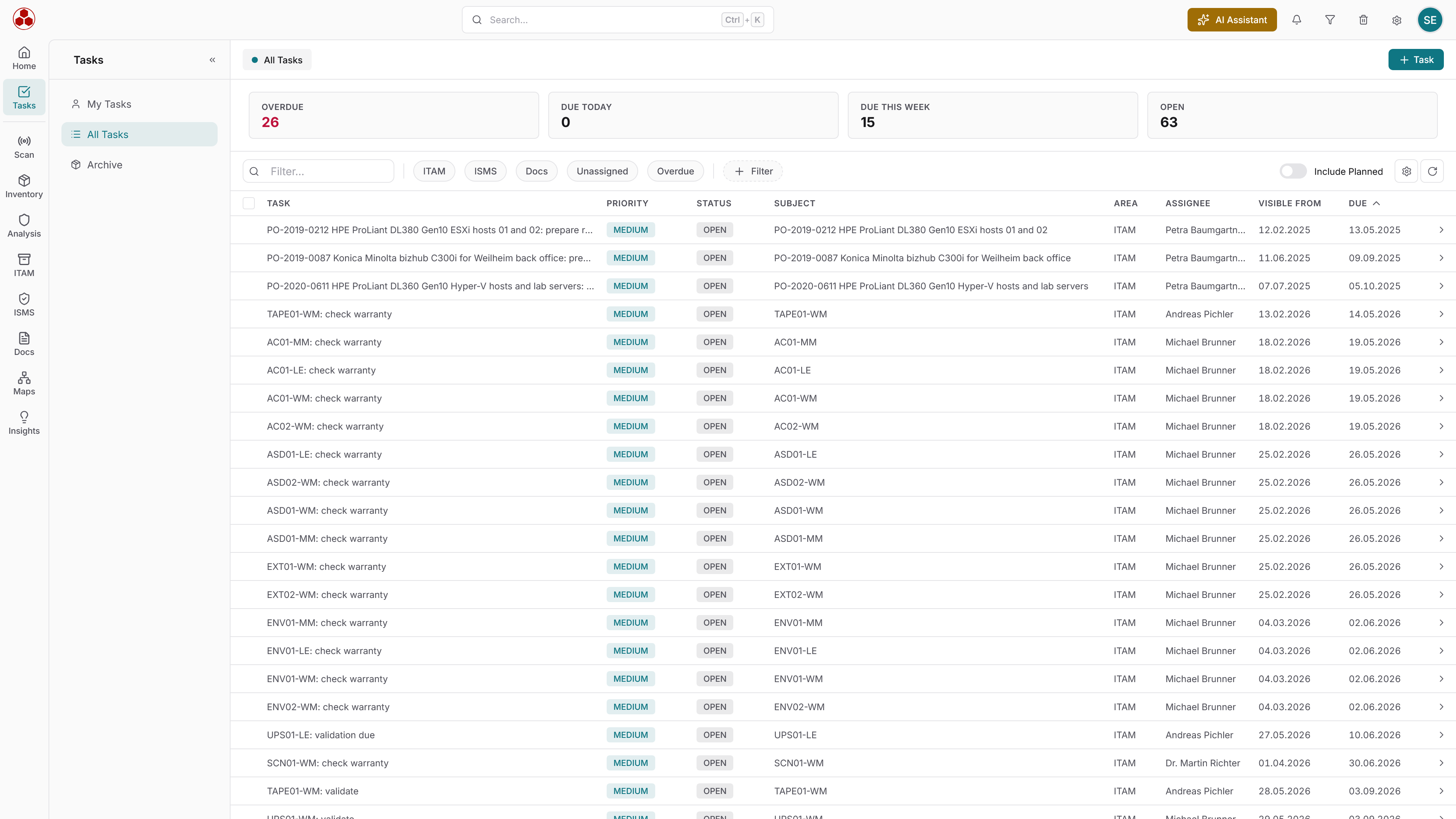
The task center in Docusnap365 consolidates tasks, approvals and actions from CMDB, ITAM, ISMS, vulnerability analysis and SmartDocs in a single view. Every task is linked to the affected asset. Dashboards show status, due dates and responsibilities. Approvals are documented and verifiable when audits require them.
From task to audit trail

Step 1

Modules create tasks

Whether a scan detects a vulnerability, a certificate expires or an ISMS action becomes due: the task appears in the task center without a manual step in between.

Step 2

Context comes along

Open a task and see the affected asset right beside it: with its documentation, permissions and change history.

Step 3

Dashboards show the status

Filter open, overdue and completed tasks by module, owner and due date.

Step 4

Approval becomes evidence

Approvals live in the same process and are always documented. Completed actions serve as evidence for ISO 27001 or NIS2.

See which modules feed into the central task management.

Ask questions instead of reading reports

The AI chat in Docusnap365 answers questions about open tasks, due dates and action status directly from the data in your environment.

Which tasks are overdue this week?

42 servers at the Munich site, 31 of them virtual on four hosts.

Who last approved server X?

Seven servers run Windows Server 2012 R2, support ended in October 2023.

Which ISMS actions are still open?

18 accounts across three groups, four of them with full access.

Which systems have had no update for 30 days?

96 clients and five servers have had no update for more than 30 days.

Where is SQL Server 2016 still running?

Four instances on three servers, two of them holding ERP databases.

Frequently asked questions about the task center

Which modules create tasks in the task center?

The task center in Docusnap365 brings together tasks, actions and approvals from CMDB, scans, ITAM, ISMS, vulnerability analysis and SmartDocs. All open items appear in one cross-module view.

What sets the task center apart from a ticketing system?

The task center does not replace a standalone ticketing system. Tasks originate within the Docusnap365 modules and are linked directly to the affected asset. Context such as documentation, permissions and change history is part of the task itself.

How do approvals work in the task center?

Approvals follow the same workflow as the task they belong to. Every sign-off is documented and traceable at any time, rather than handled via email and buried in an inbox.

How does the task center help with compliance evidence?

Completed actions in the task center double as the documentation that standards like ISO 27001 or NIS-2 require. Because approvals are documented in the same workflow, the evidence is ready when auditors ask.

How do I keep track of open and overdue tasks?

The task center dashboard shows status, due dates and responsibilities at a glance. Overdue tasks and workload are visible without having to ask around the team.

Try task management yourself

14 days of Docusnap365 with full functionality, free and without a credit card.

No automatic renewal