Solutions
IT documentation that keeps itself current
Scheduled scans discover your IT environment automatically. Your inventory stays up to date without anyone maintaining it by hand.
More than 5,000 organizations document their IT with Docusnap
Why IT documentation goes stale
Most IT teams document thoroughly when a project kicks off or an audit is on the horizon. In between, very little happens. The result: documentation that reflects the state of months ago.
Day-to-day wins
New servers, migrated VMs, changed permissions. Infrastructure changes happen constantly. When time gets tight, documentation is the first thing that falls behind.
Nobody notices right away
Outdated entries only surface when someone actually needs the information: during an audit, an outage, or troubleshooting. And that is exactly when there is no time to chase it down.
One-off updates are not enough
A documentation sprint before the audit brings the inventory to a single point in time. Three weeks later it is already outdated. Staying current takes a running process, not a deadline.
How IT documentation stays current, permanently
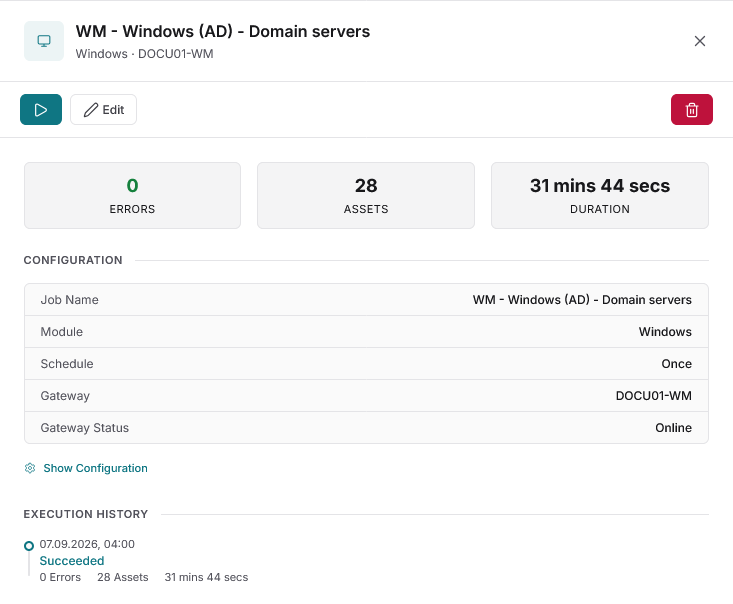
IT documentation stays current when discovery runs automatically and on a regular schedule. Docusnap365 uses a local gateway that scans the environment at freely configurable intervals and feeds the results into a central data store.
Discover automatically
The Docusnap Enterprise Gateway scans the environment agentlessly over the network. Nothing is installed on the target systems. Results flow directly into the cloud CMDB. The same mechanism also builds a complete IT inventory.
Update on schedule
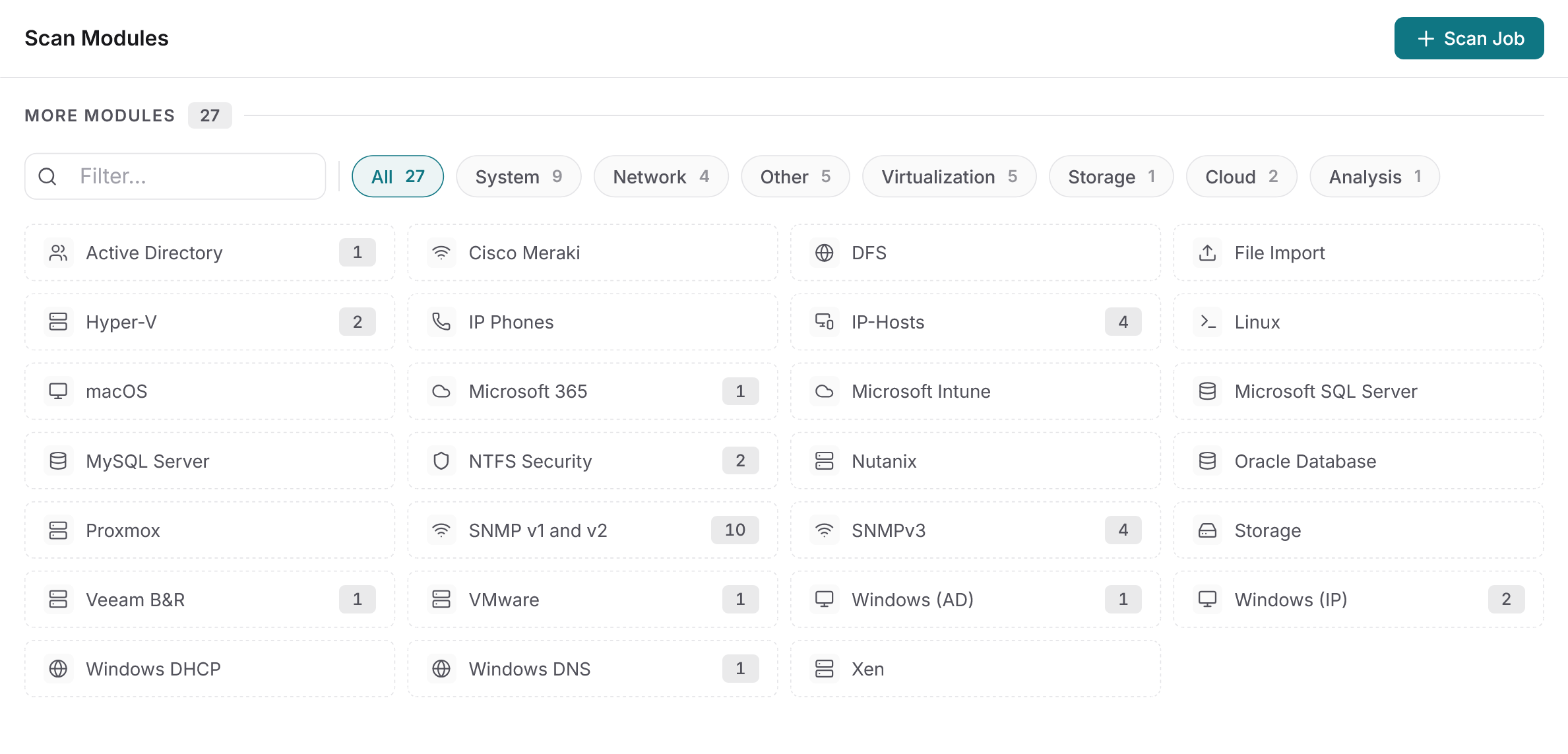
Each of the 25+ discovery modules gets its own schedule. Active Directory daily, network devices weekly, Linux servers monthly. The intervals are fully configurable.
Cover every corner
Discover your IT environment automatically, from Active Directory through Microsoft 365 to SNMPv3 network devices. Every module is included in every license. Anything the scans cannot reach can be added manually, via CSV import, or through the API.
What changes
Documentation you can trust
Plans built from scan data
Topology, network, and routing plans are generated directly from discovery results and refresh with every scan. Exportable as Visio, PDF, and more.
On-premises and cloud in one CMDB
Active Directory, Microsoft 365, Intune, VMware, Linux, and network devices all land in the same data store. No parallel inventories, no manual merging.
Current across every site
Each location or security zone runs its own gateway. All gateways feed their results into the same cloud CMDB. No limit on the number of sites or gateways.
Open to your own tools
The bidirectional REST API and the MCP interface make the inventory available outside Docusnap365. Your own automations and AI tools can query the CMDB directly.
Ask instead of search
The AI chat answers questions about your documentation in plain language. Instead of navigating inventory lists and folder structures, ask a question and get an answer straight from the current data.
42 servers at the Munich site, 31 of them virtual on four hosts.
Seven servers run Windows Server 2012 R2, support ended in October 2023.
18 accounts across three groups, four of them with full access.
96 clients and five servers have had no update for more than 30 days.
Four instances on three servers, two of them holding ERP databases.
Common questions about automatic updates
How often should discovery run?
Scan frequency is configurable per module. Fast-changing areas like Active Directory or Microsoft 365 can be scanned daily; more stable infrastructure like network devices weekly or monthly. Docusnap365 does not limit the number of scan runs.
Which systems are discovered automatically?
More than 25 discovery modules cover the common platforms: Windows, Linux, macOS, VMware, Hyper-V, Proxmox, Nutanix, Microsoft 365, Intune, Active Directory, SNMP network devices, Cisco Meraki, and databases (SQL Server, MySQL, Oracle). Every module is included in every license.
What happens to manually added data when a new scan runs?
Manually created entries, relationships, and custom fields are preserved during automatic scans. Discovery only overwrites the data points it captures itself.
Does the update process work across multiple sites?
Yes. Each location or security zone runs its own Docusnap Enterprise Gateway. All gateways feed their results into the same cloud CMDB. There is no limit on the number of sites or gateways.
Does Docusnap365 require an agent on the target systems?
No. Discovery is agentless, using standard protocols (WMI, SSH, SNMP). Nothing is installed on the target systems. The gateway only needs an outbound HTTPS connection to the cloud.
See for yourself how documentation stays current
In the free trial you can discover your own environment right away. One gateway is all it takes, and scheduled updates run from the very first scan.
14 days free, with your own data