Solutions
Be prepared for IT emergencies
When systems fail, the quality of your IT documentation determines how fast your team can act.
Starting point
What goes wrong in an IT emergency
A server failure, a ransomware attack, a critical update with unexpected consequences. In an IT emergency, minutes count. That is precisely when the documentation that works separates itself from the documentation that merely exists.
Outdated network plans, dependencies that only one colleague knows about, responsibilities that are not recorded anywhere: most IT organisations are aware of the gaps in their emergency documentation. The question is whether those gaps become visible before the incident occurs.
Anyone who first has to work out which systems exist, how they are connected, and who is responsible for which recovery step loses exactly the time that makes the difference between a controllable disruption and a full-blown outage.
Approach
Three building blocks of reliable disaster recovery documentation
IT disaster recovery preparation requires three things: a current, complete documentation of all IT systems and their dependencies, structured emergency documents with clear responsibilities and recovery procedures, and fast access to this information when it matters. With this foundation, the IT disaster recovery plan becomes a working tool instead of a static document.
Docusnap365
What Docusnap365 brings to your disaster recovery preparation
Docusnap365 provides the documentary foundation on which IT disaster recovery plans are built. The platform inventories the IT estate automatically, documents relationships between systems, and delivers structured emergency documents.
Automated inventory
Over 25 modules capture the entire IT estate agentlessly and on schedule. Network plans, topologies, and system configurations are updated with every scan. No more outdated data - and you’re always perfectly prepared for an emergency.
Dependencies and relationships
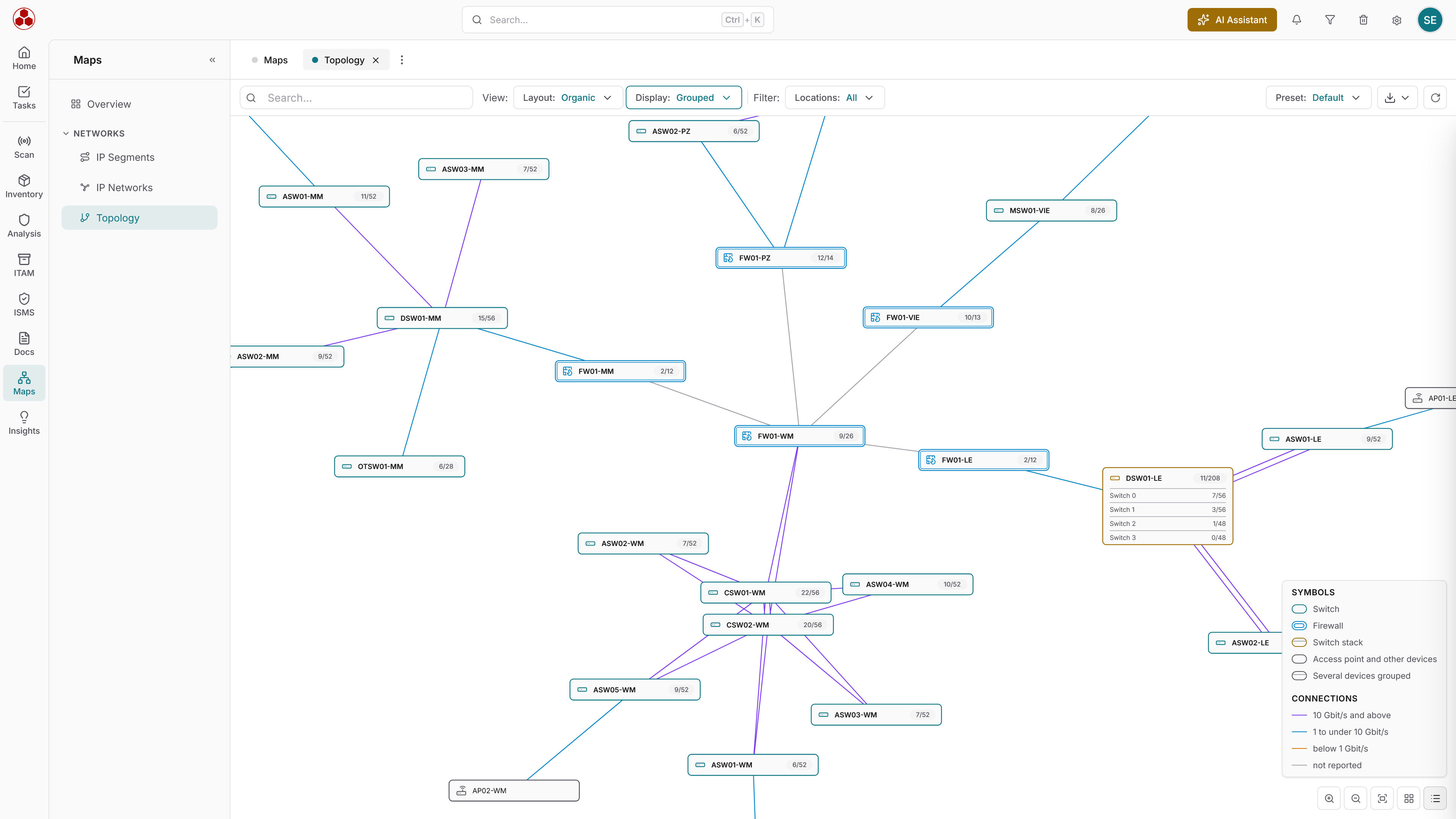
Docusnap365 detects relationships between IT components automatically during inventory and displays them graphically. In an outage, it is immediately visible which downstream systems are affected.
SmartDocs for emergency handbooks
Structured IT documents with document control, versioning, and signed PDF export. Emergency handbooks sit right next to the assets they concern. The approval process reflects what ISO 27001 requires for document control.
AI chat for quick access
Ask questions in natural language instead of searching folder structures in an emergency. The AI chat answers questions directly from the CMDB data. The AI chat uses an AI model from an external provider that is operated exclusively within the EU. Data processing is conducted in accordance with the GDPR, and your data will not be transferred outside the EU.
Outcome
What changes with structured disaster recovery preparation
Without current emergency documentation
- Network plans do not match the real infrastructure
- Dependencies are reconstructed from memory during the emergency
- Responsibilities are unclear, queries cost time
- Emergency handbooks exist as static Word files without an approval process
- Recovery starts with a stocktake instead of a plan
With Docusnap365
- Network plans and topologies update automatically with every scan
- Relationships between systems are documented and graphically visible
- Every asset has an owner, a location, and a cost centre
- Emergency handbooks are controlled SmartDocs with versioning and signed PDF export
- Recovery follows documented procedures with clear responsibilities
IT disaster recovery preparation is not a one-off project. Because Docusnap365 updates the estate automatically with every scan, the documentation is always up do date.
IT disaster recovery starts with current documentation
Try Docusnap365 and see how your IT documentation becomes the reliable foundation for the worst case.