IT inventory software that captures all of your IT
From clients to cloud services: Docusnap365 inventories your IT infrastructure agentlessly and delivers an inventory that updates itself with every scan.
What IT inventory software does for your IT team
IT inventory software scans an organization's entire infrastructure automatically: servers, clients, network devices, virtualization, and cloud services. A local gateway connects to target systems via standard protocols, reads configurations and inventories, and feeds the results into a central database. The outcome is an inventory that stays current with every scan. Docusnap365 turns this principle into a cloud-based platform. From the inventoried data, Docusnap365 generates network maps, topologies, and IT documentation.
What good IT inventory depends on
Three criteria every inventory solution should meet.
Completeness
An IT inventory that only knows part of your infrastructure distorts the picture. Hardware, virtual machines, cloud subscriptions, network components, databases: everything belongs in one shared data source, including the dependencies between systems.
Currency
Every IT environment changes constantly: new servers, updated IP ranges, additional cloud services. Good inventory software keeps the data current through regular, automated scans so the database reflects the actual state of things.
Zero impact
Inventory collection must not affect production operations. Agentless discovery via standard protocols is the proven approach: read-only access, no software installation on target systems, no effect on performance or availability.
How Docusnap365 inventories your IT infrastructure
Set up the gateway
The Docusnap Enterprise Gateway (DEG) is installed in your environment. The only prerequisite: an outbound HTTPS connection to the cloud. Credentials stay entirely inside the gateway, within your infrastructure. No inbound connections or open firewall ports required.
Choose modules and schedule
Windows servers, network devices, Microsoft 365, databases: you pick the inventory modules that match your environment. You set the scan schedule yourself, whether daily full scans or targeted weekly runs. Each module can have its own schedule.
Inventory from the first scan
After just one run, hardware inventories, software installations, and network configurations are ready in the cloud CMDB. Every subsequent scan keeps everything current. Export results as Visio, PDF, CSV, or Excel at any time.
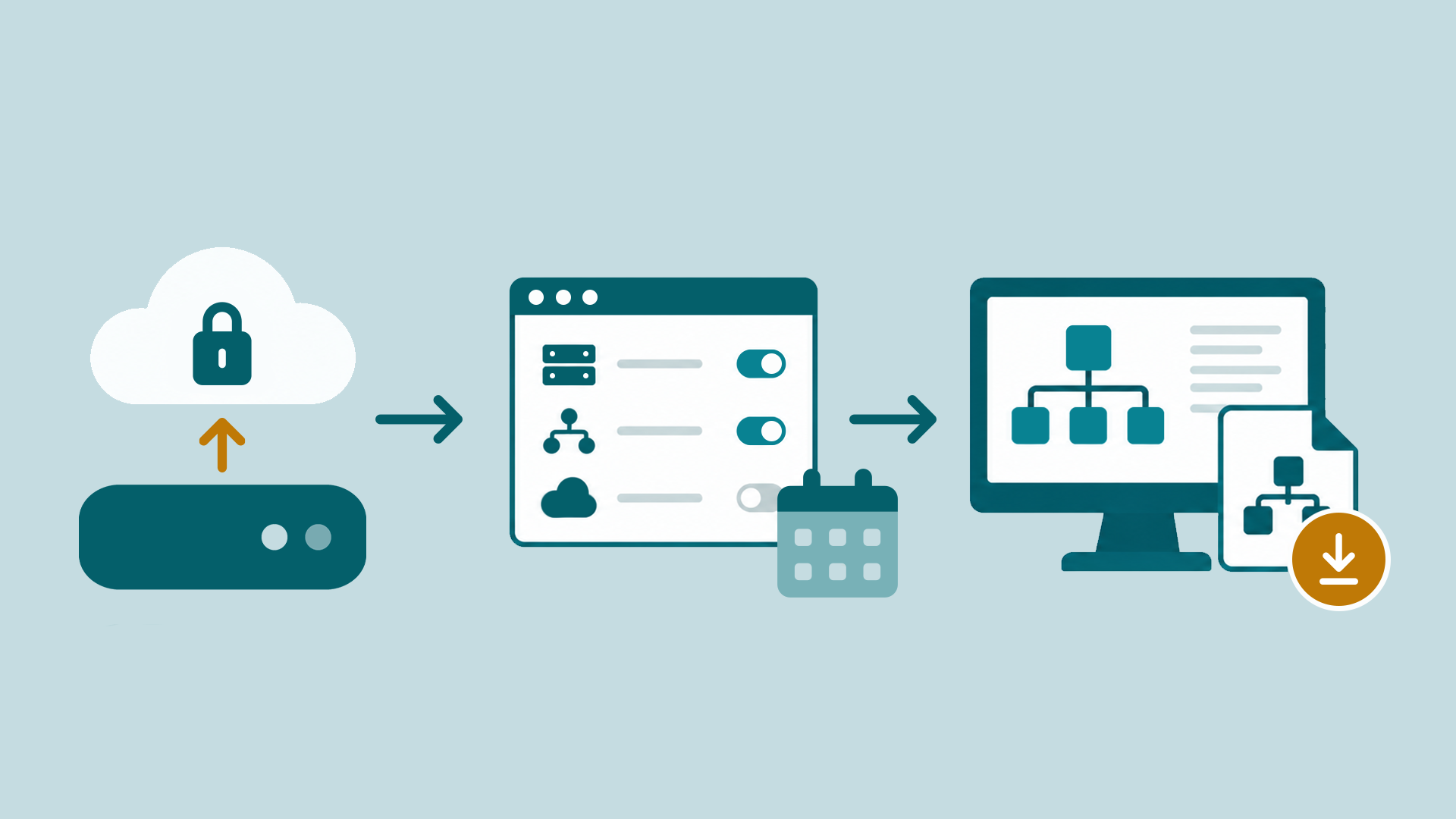
Data flow in Docusnap365:
the local gateway scans the IT environment and transfers results to the cloud CMDB
Which systems Docusnap365 inventories
Over 25 inventory modules, all included in every Docusnap365 license. Discovery works agentlessly via WMI, SSH, and SNMP and covers the following areas:
Servers and clients
Windows, Linux, macOS: hardware specs, installed software, running services, and network configuration, captured at a glance.
Virtualization
VMware, Hyper-V, Proxmox, Nutanix: VMs, hosts, datastores, and snapshots, documented centrally in one data source.
Cloud and identity
Microsoft 365, Intune, Active Directory: users, licenses, groups, GPOs, and compliance policies in the same CMDB as your on-premises infrastructure.
Network
Switches, routers, access points: discovery via SNMPv1/v2/v3 and Cisco Meraki. Including IP hosts, DHCP scopes, and DNS zones.
Databases
Microsoft SQL Server, MySQL, Oracle: instances, schemas, permissions, and configurations, discovered and documented automatically.
Backup and storage
Veeam Backup & Replication, SAN/NAS systems: backup jobs, repositories, volumes, and protected machines at a glance.
What sets Docusnap365 apart from other inventory tools
Agentless and zero-impact
Docusnap365 scans via WMI, SSH, and SNMP. Target systems remain completely untouched: read-only access over standard protocols, no software installation. A principle trusted by over 5,000 companies.
Automatically current
Once configured, inventory runs on schedule in the background. Hardware inventories, software installations, and network configurations update with every scan, whether daily, weekly, or on a per-module schedule.
One data source for everything
On-premises servers and cloud services in the same CMDB. Docusnap365 detects relationships and dependencies between components automatically and visualizes them graphically. The result is a complete IT documentation.
Every module included
Over 25 inventory modules, from hardware inventory through network inventory to cloud discovery: the full feature set is included in every Docusnap365 license.
IT inventory without and with Docusnap365
What changes when your IT inventory is built automatically instead of depending on individual people.
Without IT inventory software | With Docusnap365 |
|---|---|
Spreadsheets, scattered notes, manual updates: the inventory is accurate on the day it is created, then it drifts. | Every scan captures the current state automatically. New devices, changed configurations, additional cloud services are in the inventory after the next run. |
Each site maintains its own overview. A cross-site assessment means pulling data from multiple sources first. | All sites, all systems, one central cloud CMDB. Regardless of whether one or twenty gateways deliver the data. |
Hardware that has fallen out of support is noticed only when it fails. Software nobody uses stays on the license bill. | Hardware inventories, software installations, and license status are available at any time, including age, status, and assignment to IT asset management. |
When the colleague who has the overview is on vacation, the rest of the team loses its working basis. | The inventory belongs to the organization. Everyone on the team sees the same, current state, via the interface or through the AI chat. |
Frequently asked questions about IT inventory
What exactly does Docusnap365 capture, and which platforms are covered?
Over 25 inventory modules cover the full spectrum: Windows, Linux, macOS, virtualization (VMware, Hyper-V, Proxmox, Nutanix), cloud services (Microsoft 365, Intune), network devices via SNMP and Cisco Meraki, databases (SQL Server, MySQL, Oracle), Active Directory, DHCP, DNS, and backup systems such as Veeam. Every module is included in every license.
Does Docusnap365 require an agent on target systems?
Docusnap365 is fully agentless. The Docusnap Enterprise Gateway (DEG) handles the scans inside your environment via WMI, SSH, and SNMP. Target systems remain untouched: read-only access over standard protocols, nothing more.
How current does the inventory stay when the infrastructure changes?
As current as the last scan. Scheduled inventory runs in the background, daily, weekly, or on a per-module schedule. Every run updates the entire inventory automatically: new servers, changed IP addresses, additional cloud services flow in on the next scan.
We operate multiple sites with separate security zones. Is that supported?
Yes, fully. Each site or security zone can run its own DEG. There is no limit on the number of gateways. All data flows into the same cloud CMDB, regardless of whether it comes from one gateway or twenty. Segmented environments with a tiered model are supported.
What export formats are available, and is there an API?
Docusnap365 exports to Visio, PDF, CSV, and Excel. For automated data exchange, a bidirectional REST API and the MCP interface are available. This makes it possible to feed inventoried data into external systems or use it with your own AI tools.
Where is the data stored, and how is data privacy handled?
Inventory data is stored in the Docusnap365 cloud CMDB. Credentials stay exclusively inside the local gateway and never leave your environment. Docusnap365 requires only an outbound HTTPS connection; no inbound ports need to be opened. The built-in AI model is hosted in the EU on dedicated infrastructure, GDPR-compliant.
Ready to inventory your IT automatically?
From the first scan to a complete IT inventory: discover how Docusnap365 captures your hardware, software, and cloud services agentlessly and keeps them current.